
Search for “Hostinger coupon” and you will find pages promising 90% off, a secret voucher, or a link that unlocks a price nobody else can see. Most of them are affiliate pages recycling the same introductory offer. A few codes work. Many do not. None of them change the fact that hosting is a subscription with a renewal date.
This guide is not a coupon list. It is a way to read a hosting bill so you can tell whether an offer is genuinely good for your project. The principles apply to Hostinger and to every other host.
Why the advertised monthly price is misleading
Hosting pages often show a large number with “/mo” underneath. The small print usually says the price requires a 24-month or 48-month prepaid term. You are not paying monthly. You are paying the full term upfront, and the monthly figure is the total divided by the number of months.
That is not a scam. It is a cash-flow decision. A longer term can lower the effective monthly cost, but it also locks up more money and makes it harder to switch if the product does not fit. The right term depends on your confidence in the project and your budget.
effective monthly cost = total due today ÷ months included

Example: ₹9,870 ÷ 24 months = ₹411.25 per month
(Use your own cart total, including tax and required add-ons.)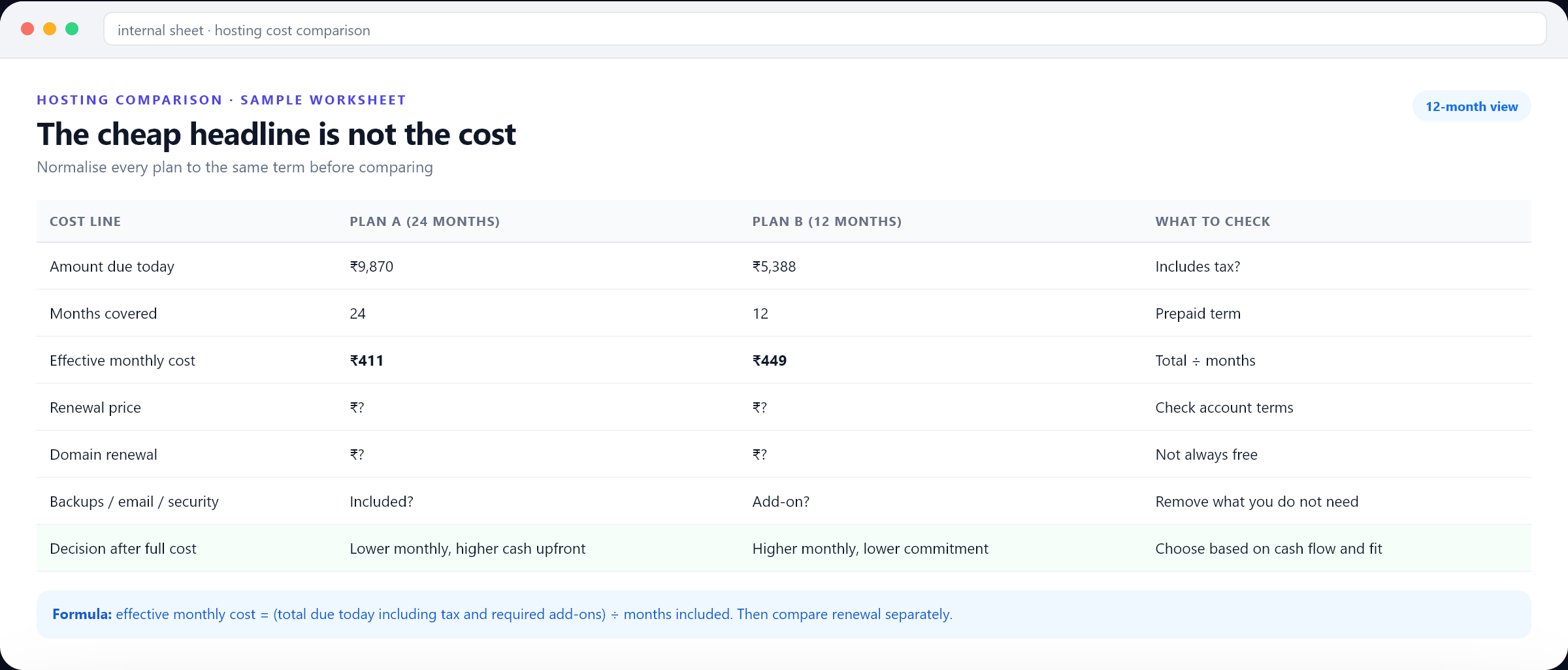
The five numbers that decide the real price
| Number | Where to find it | Why it matters |
|---|---|---|
| NumberTotal due today | Where to find itCheckout summary | Why it mattersThe actual amount leaving your account |
| NumberMonths included | Where to find itPlan and cart | Why it mattersLets you calculate the effective monthly cost |
| NumberRenewal price | Where to find itAccount and terms | Why it mattersThe cost after the introductory term |
| NumberRequired add-ons | Where to find itCart line items | Why it mattersBackups, email and security can change the total |
| NumberTax treatment | Where to find itCheckout | Why it mattersGST or local tax may be added or included |
A coupon can reduce the first number, but it rarely changes the renewal. A “free” domain can remove one line while a pre-selected backup add-on adds another. Compare the complete bill, not the banner.
How Hostinger coupons actually behave
Hostinger runs promotions through its own checkout and through affiliate partners. A code may be accepted for one plan and rejected for another. It may work only on a first purchase, only in certain regions, or only when stacked with a specific term. Some codes are seasonal; others expire quietly.
- Apply the code in the official checkout, not on a third-party page that claims to apply it for you.
- Check the cart before and after. A valid code should visibly reduce the total or add a named benefit.
- Read the terms for exclusions. Renewals, domain transfers and add-ons may be excluded.
- Do not buy an unnecessary plan to unlock a code. The discount is rarely worth the extra spend.
- If the code fails, do not assume support will honour it later. Ask before paying.
Compare plans by workload, not by price alone
The cheapest plan is only good value if it supports the site you are building. A one-page portfolio has different needs from a WooCommerce store with 500 products, a membership site with video or a Node.js application. Start with the requirements, then compare the price of the plans that meet them.
Compare the limits that matter to your project
These are decision prompts, not a live plan or price comparison. Product names, resources, and included features vary; verify the current details for your region before purchasing.
One small site
A portfolio, brochure site, or first blog.
- One-site limit
- Included backups
- Domain eligibility
Business site or store
A company site with forms, products, or steady growth.
- Resource limits
- Backup frequency
- Staging and support
App or higher demand
A project with custom runtime or stronger resource needs.
- Runtime availability
- CPU and memory limits
- Scaling options
| Requirement | What to check | Why the cheap plan may fail |
|---|---|---|
| RequirementOne brochure site | What to checkStorage, SSL, backups, email | Why the cheap plan may failUsually fine on an entry plan |
| RequirementOnline store | What to checkDatabase size, PHP limits, staging, backup frequency | Why the cheap plan may failResource limits can slow checkout |
| RequirementMembership or course | What to checkStorage, bandwidth, video handling, user limits | Why the cheap plan may failVideo and member data grow quickly |
| RequirementAgency with multiple sites | What to checkSite limits, client access, staging, support | Why the cheap plan may failPer-site plans become expensive |
| RequirementCustom app | What to checkNode/Python support, cron, memory, persistent storage | Why the cheap plan may failShared hosting may not run the stack |
The add-ons that quietly raise the bill
Hosting checkouts often include optional services: backups, email, security, SEO tools, priority support. Some are useful. Some duplicate tools you already pay for. Review each line and decide based on the project, not the discount badge.
- Backups: essential for a business site. Check frequency, retention and restore speed.
- Business email: useful if you want a professional address. Compare with Google Workspace or Zoho.
- Security: check what is already included before buying an extra scanner.
- SEO tools: usually unnecessary if you already have a keyword and analytics stack.
- Priority support: worth it for a revenue-critical site, less so for a hobby blog.
- Domain privacy: confirm whether it is included for your extension.
If an add-on is pre-selected, remove it and see whether the total changes. Then decide whether you actually need it. A cheaper cart is not always a better setup, but an unused add-on is never a good deal.
Is the longest term really the lowest price?
On paper, a 48-month term often has the lowest monthly equivalent. In practice, it requires the largest upfront payment and the longest commitment. If your project changes, you may end up paying for hosting you no longer use.
| Term | Advantage | Risk |
|---|---|---|
| Term12 months | AdvantageLower commitment, easier to change | RiskHigher monthly equivalent |
| Term24 months | AdvantageBalance of price and commitment | RiskTwo years of prepayment |
| Term48 months | AdvantageLowest advertised monthly equivalent | RiskLarge upfront cost and long lock-in |
For a new business or an untested idea, a shorter term is often worth the higher monthly cost. For an established site that has been stable for years, a longer term can be a reasonable way to reduce the effective price, provided you have checked the renewal and refund terms.
What about the free domain and other bundle offers?
A free domain can be a genuine saving in the first year. It can also distract from the hosting renewal. Check the extension, the registration term, the renewal price and whether privacy is included. A free domain that renews at a high rate is not free over the life of the site.
The same applies to bundled email, SSL and backups. They have value only if you use them. A bundle that includes five tools you do not need is not cheaper than a plan with the two tools you do.
A realistic cost comparison in six steps
- 01
Define the workload
Sites, storage, traffic, email, store or app requirements. Write it down before opening the pricing page.
- 02
Shortlist two or three plans
Only plans that meet the requirements. Ignore plans that cannot run the project.
- 03
Normalise the term
Convert each offer to total due today and effective monthly cost for the same number of months.
- 04
Add the required extras
Backups, email, SSL, priority support. Include tax if it is added at checkout.
- 05
Check renewal
Find the renewal price, frequency and auto-renew setting for each line.
- 06
Decide with the full picture
Choose the plan with the best fit and a total you can sustain, not the lowest banner price.
₹411
Sample effective monthly cost
₹9,870 ÷ 24 months, illustrative
₹1,188
Sample backup add-on
Check whether you need it
₹1,506
Sample GST line
Confirm tax treatment in your cart
₹9,870
Sample total due today
Not a live quote
Ways to lower the bill without compromising the site
- Choose the smallest plan that meets the current requirement, with a clear upgrade path.
- Remove add-ons you already have elsewhere.
- Use annual billing only if the discount justifies the commitment.
- Buy the domain through a registrar you control if the bundle is not competitive.
- Review the renewal 30–45 days early and compare alternatives calmly.
- Consolidate multiple small hosting accounts where it makes operational sense.
- Do not switch hosts every month chasing a few hundred rupees. Migration has a cost too.
The biggest savings usually come from not overbuying. A business that buys a plan for 100 websites when it has one, plus three add-ons it never opens, is not saving money. It is donating it to a dashboard.
Refunds, cancellations and the small print
Check the refund window and the conditions. Domain registrations, add-ons and used services may be excluded. If you cancel, confirm what happens to the domain, email and backups. Export anything you need before the account closes.
Also check the payment method. Some providers offer different prices or currencies by region. Your bank may add a foreign transaction fee. A low dollar price can become a higher rupee charge after conversion and fees.
The final checklist
- The plan meets the site's actual requirements.
- The total due today includes tax and only the add-ons you need.
- The effective monthly cost is calculated from the real total and term.
- The renewal price and date are recorded.
- The coupon is accepted visibly in the official checkout.
- The domain is registered to an account the business controls.
- A reminder is set 30–45 days before renewal.
A good hosting bill is boring: it fits the project, the total is understood, the renewal is planned and nobody has to think about it for another year. That is a better outcome than saving a few hundred rupees on a plan you will regret.
Need help with your setup?
Ask our team about setup support and mention code DIGIAEROTECH20. Available help and response times are confirmed case by case; no audit or service is guaranteed by this article.
The best hosting discount is buying the right plan in the first place.