
A free .com domain sounds like a straightforward perk. In practice, the offer has conditions: the hosting plan, the billing term, the domain extension, the region and the point of checkout all matter. The businesses that get value from it are the ones that read the cart before paying.
This guide walks through the offer the way we would set it up for a client. It does not promise a specific price or that a particular name is available. Hostinger changes plans and promotions, so the live checkout is the source of truth.
What “free domain” usually means
Hosting providers often include a domain registration with a qualifying plan for the first billing term. The domain is registered in your account, but the cost is bundled into the hosting price or shown as a ₹0 line in the cart. After the initial term, the domain renews at the registrar's standard rate unless you cancel it.
The details vary. A promotion may cover a .com but not a .in, or a one-year registration but not a multi-year one. It may require a 12-month or 24-month hosting term. It may exclude premium domains, expired domains or names already registered. A “free domain” banner is a starting point, not proof that your exact name qualifies.
| Question | Why it matters | Where to check |
|---|---|---|
| QuestionWhich plans qualify? | Why it mattersA cheaper plan may not include the domain | Where to checkPlan comparison and offer terms |
| QuestionWhich extensions qualify? | Why it matters.com, .in and .co may be treated differently | Where to checkDomain search and cart |
| QuestionWhat billing term is required? | Why it mattersLonger terms lower the monthly price but increase cash upfront | Where to checkCheckout summary |
| QuestionIs renewal included? | Why it mattersThe first term may be free; renewal usually is not | Where to checkDomain settings and terms |
| QuestionIs privacy protection included? | Why it mattersWHOIS privacy varies by extension and registrar | Where to checkDomain add-ons and terms |
| QuestionWho owns the registration? | Why it mattersYou need control of renewal and DNS | Where to checkAccount and registrant details |
Step 1: Choose the plan by what the site needs
Do not choose a hosting plan because it makes the domain free. Choose the plan that fits the site, then check whether the domain offer applies. A brochure site with a contact form has different requirements from a WooCommerce store, a LearnDash course or a Node.js application.
- Number of websites you need to host now and in the next year.
- Storage and bandwidth, with headroom for images and backups.
- Backup frequency and restore process. A backup you cannot restore is not a backup.
- Email hosting. If you need business email, check whether it is included or an add-on.
- Staging, SSL, caching and support response times.
- Application runtime and database limits if you are not building a simple WordPress site.
For a first website, a shared plan is often enough. For a business that depends on the site for leads, prioritise speed, backups and support over the lowest headline price. The domain is a small part of the total cost of ownership.
Compare the limits that matter to your project
These are decision prompts, not a live plan or price comparison. Product names, resources, and included features vary; verify the current details for your region before purchasing.
One small site
A portfolio, brochure site, or first blog.
- One-site limit
- Included backups
- Domain eligibility
Business site or store
A company site with forms, products, or steady growth.
- Resource limits
- Backup frequency
- Staging and support
App or higher demand
A project with custom runtime or stronger resource needs.
- Runtime availability
- CPU and memory limits
- Scaling options
Step 2: Search for the domain you actually want
Search for the name and extension in the hosting provider's domain search. Check spelling, pronunciation and whether the name is already used by another business in your market. A domain that is free but confusing is not a bargain.
A few naming rules we use with clients:
- Prefer a short, pronounceable .com if your audience is national or international.
- Use a .in or a city-specific domain only when local relevance is the main goal and the name still reads naturally.
- Avoid hyphens, doubled letters and numbers that people will mishear on a phone call.
- Check the name on social platforms and Google before committing.
- Search the trademark register in your market if the brand matters. A domain does not give you trademark rights.
Step 3: Read the cart like an accountant
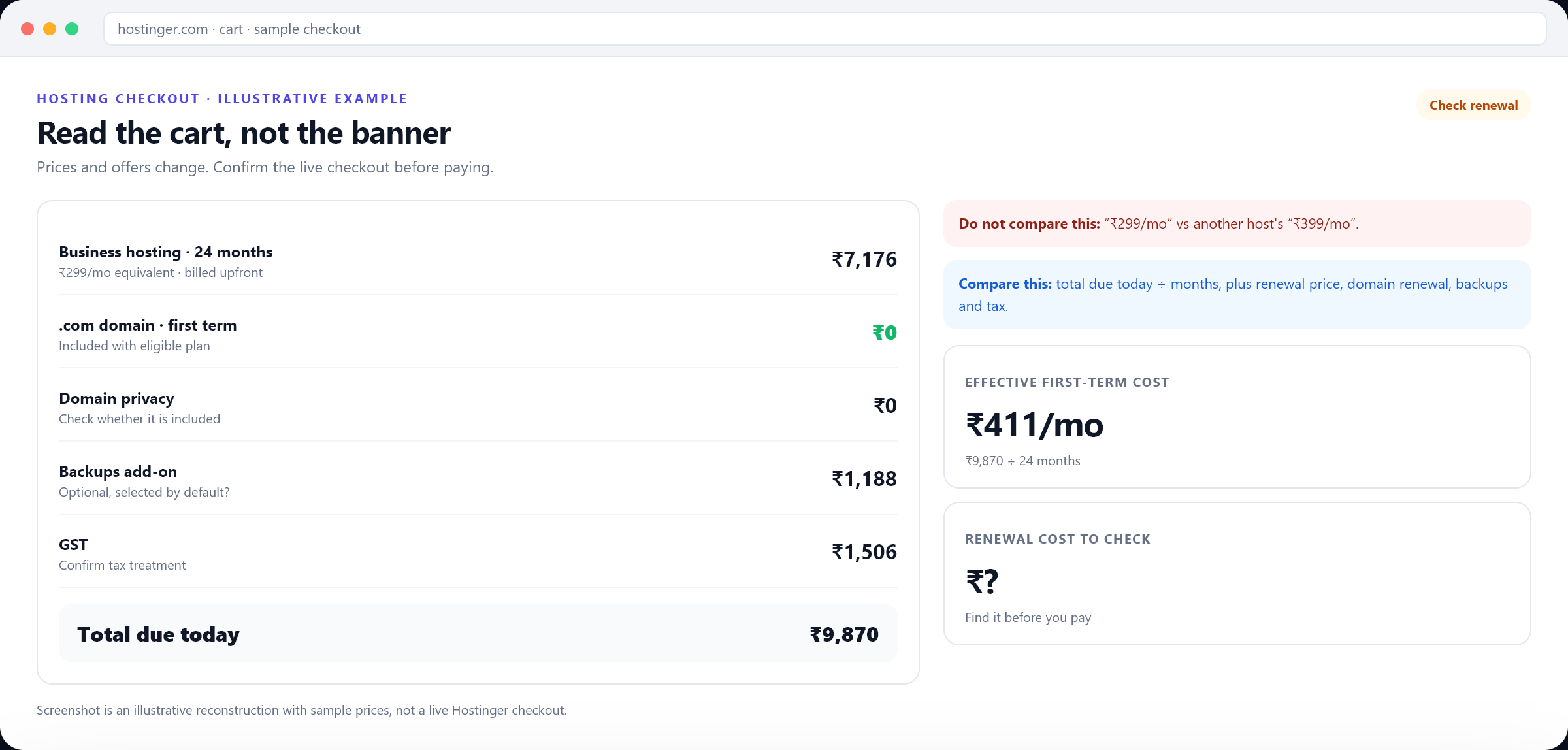
The cart is where the real offer is defined. Expand every collapsed section and read each line: hosting term, domain registration, privacy, SSL, backups, email, priority support, tax and total due today. Remove anything you did not intend to buy.
- 01
Check the domain line
It should show the exact name and extension, with a ₹0 or included label if the offer applies.
- 02
Check the term
Confirm how many months of hosting you are paying for and whether the domain is registered for one year or longer.
- 03
Check the add-ons
Backups, email and security tools are sometimes pre-selected. Keep only what the project needs.
- 04
Check the tax
Confirm whether GST or local tax is included in the displayed total.
- 05
Check the renewal price
Find the renewal amount and date for both hosting and domain. Save a screenshot or PDF of the order summary.
If the domain does not appear as included, do not assume support will apply the discount after you pay. Recheck the plan, term, extension and promotion terms. If the offer still looks inconsistent, contact the provider before completing the order and keep the offer page and cart details.
Step 4: Register the domain to the right account
The domain should be registered to the business, not to a freelancer's personal account or an email address that will disappear when an employee leaves. Use a business email you control, enable two-factor authentication and store the recovery codes somewhere safe.
Check the registrant contact details before submitting. Some extensions require registrant information to be public or verified. If privacy protection is available, confirm whether it is included or a paid add-on. Privacy rules differ by extension and jurisdiction.
Step 5: Point the domain at the site and verify it
After checkout, open the domain settings and confirm the nameservers or DNS records. If you are using the host's website builder or managed WordPress, the correct nameservers are usually applied automatically. If you are connecting an external app, add the required A, CNAME or TXT records.
- Wait for DNS propagation before changing records repeatedly. It can take minutes or several hours depending on the TTL and resolver.
- Confirm the www and non-www versions both resolve to the intended site.
- Install SSL and verify that the padlock appears on the live domain, not only on a temporary preview URL.
- Set up a business email address on the domain if the plan includes it.
- Add the domain to Google Search Console and submit the sitemap.
- Check the site on a phone and a desktop, not only in the hosting preview.
The renewal trap: what to check before year two
Introductory pricing is common in hosting. The first term may be discounted, and the domain may be included. At renewal, both can change. That does not make the offer dishonest, but it does mean the first invoice is not the full cost of ownership.
Find the renewal price for the hosting plan and the domain. Note the renewal date and whether auto-renew is on. Set a calendar reminder 30–45 days before renewal so you can compare alternatives without pressure. If you plan to keep the domain but move hosting, you can usually keep the registration and update the nameservers.
| Cost | First term | Renewal | What to do |
|---|---|---|---|
| CostHosting | First termPromotional or bundled | RenewalUsually higher | What to doCompare the renewal price, not only the intro price |
| CostDomain | First termOften included | RenewalUsually paid | What to doCheck the renewal rate for the exact extension |
| CostPrivacy | First termMay be included | RenewalMay be paid | What to doConfirm before the renewal date |
| CostBackups / email | First termSometimes an add-on | RenewalUsually recurring | What to doKeep only the services you use |
| CostSSL | First termOften included | RenewalConfirm | What to doCheck that the certificate renews automatically |
If the renewal is higher than you expected, you are not stuck. You can usually keep the domain, move the hosting, or transfer the registration to another registrar after any lock period. Check the transfer rules and fees for the extension before you decide.
Is the free domain actually worth it?
A free .com can save a meaningful amount in the first year, especially for a new business testing an idea. It is worth taking if the plan fits, the renewal is acceptable and you keep control of the registration. It is not worth taking if it locks you into a plan you do not need, hides a renewal you cannot afford, or puts the domain in someone else's account.
1 year
Typical included registration
Confirm the exact term in the cart
₹0
Domain line in a qualifying cart
Not a guarantee for every plan or extension
30–45 days
Reminder before renewal
Enough time to compare options
2FA
Minimum account security
Plus recovery codes stored offline
Common mistakes to avoid
- Buying the longest term only because the monthly equivalent looks lowest.
- Assuming the domain is free forever.
- Registering the domain under a developer's personal account.
- Choosing a name that is hard to spell or too close to an existing trademark.
- Ignoring the renewal price and the auto-renew setting.
- Skipping SSL or business email because the domain was free.
- Changing nameservers repeatedly during propagation and breaking the site.
A domain is the address customers will type, share and search for years from now. The best deal is not the one with the lowest first invoice. It is the one that gives you a name you can keep, an account you control and a renewal you can plan for.
Need help with your setup?
Ask our team about setup support and mention code DIGIAEROTECH20. Available help and response times are confirmed case by case; no audit or service is guaranteed by this article.
The cheapest domain is not the one with the lowest first-year price. It is the one you still control when the promotion ends.